This page was generated from
docs/examples/mineralML_interactive.ipynb.
Interactive online version:
 .
.
[1]:
""" Created on April 24, 2026 // @author: Sarah Shi """

import numpy as np
import sys
sys.path.append('../../src/')
import mineralML as mm

import matplotlib.pyplot as plt
%matplotlib inline
%config InlineBackend.figure_format = 'png'
Interactive Tools for Mapped EDS Data

This notebook demonstrates interactive tools for exploring mineralML phase maps. These tools require a live Python kernel and an interactive Matplotlib backend — they cannot be run on ReadTheDocs. Use the Colab badge above or run locally with %matplotlib widget (requires ipympl).
pip install ipympl
The tools shown here are:
``mm.interactive_pixels`` — click pixels to sample oxide compositions
``mm.interactive_line_profile`` — click to draw transects and extract line profiles
``mm.plot_locations`` — plot the locations of picked pixels or transects on a map
1. Load and run a map
First, run mm.run_map as usual to get the result dictionary. See the EDS mapping notebook for full details on loading and preparing data.
[2]:
%matplotlib inline

result = mm.run_map(
    "Maps/09g3",
    renormalize=True,
    units="element_wt%",
    pixel_size_um=4.0,
    scalebar_um=50,
    total_threshold=50,
    min_frac=0.01,
)
[ok] Mg Wt%Montaged Map Data.csv  →  Mg  (329, 283)
[ok] Ca Wt%Montaged Map Data.csv  →  Ca  (329, 283)
[ok] Al Wt%Montaged Map Data.csv  →  Al  (329, 283)
[ok] Fe Wt%Montaged Map Data.csv  →  Fe  (329, 283)
[ok] Na Wt%Montaged Map Data.csv  →  Na  (329, 283)
[ok] Mn Wt%Montaged Map Data.csv  →  Mn  (329, 283)
[ok] Cr Wt%Montaged Map Data.csv  →  Cr  (329, 283)
[ok] Ti Wt%Montaged Map Data.csv  →  Ti  (329, 283)
[ok] Si Wt%Montaged Map Data.csv  →  Si  (329, 283)
[ok] K Wt%Montaged Map Data.csv  →  K  (329, 283)
mineralML: 93107 rows — 57732 classified by neural network, 0 by empirical rules (Zircon: 0, SiO2 polymorph: 0, Carbonate: 0), 35375 skipped (invalid/empty)
prep_df: 57732 row(s) processed (of 57732 input, 0 dropped).
/Users/sarahshi/Documents/GitHub/mineralML/docs/examples/../../src/mineralML/hybrid.py:280: UserWarning: The column 'Mineral' was missing and has been filled with NaN.
  df = prep_df(df)
/Users/sarahshi/Documents/GitHub/mineralML/docs/examples/../../src/mineralML/hybrid.py:280: UserWarning: Non-numeric values in 57732 row(s) were coerced to NaN.
  df = prep_df(df)
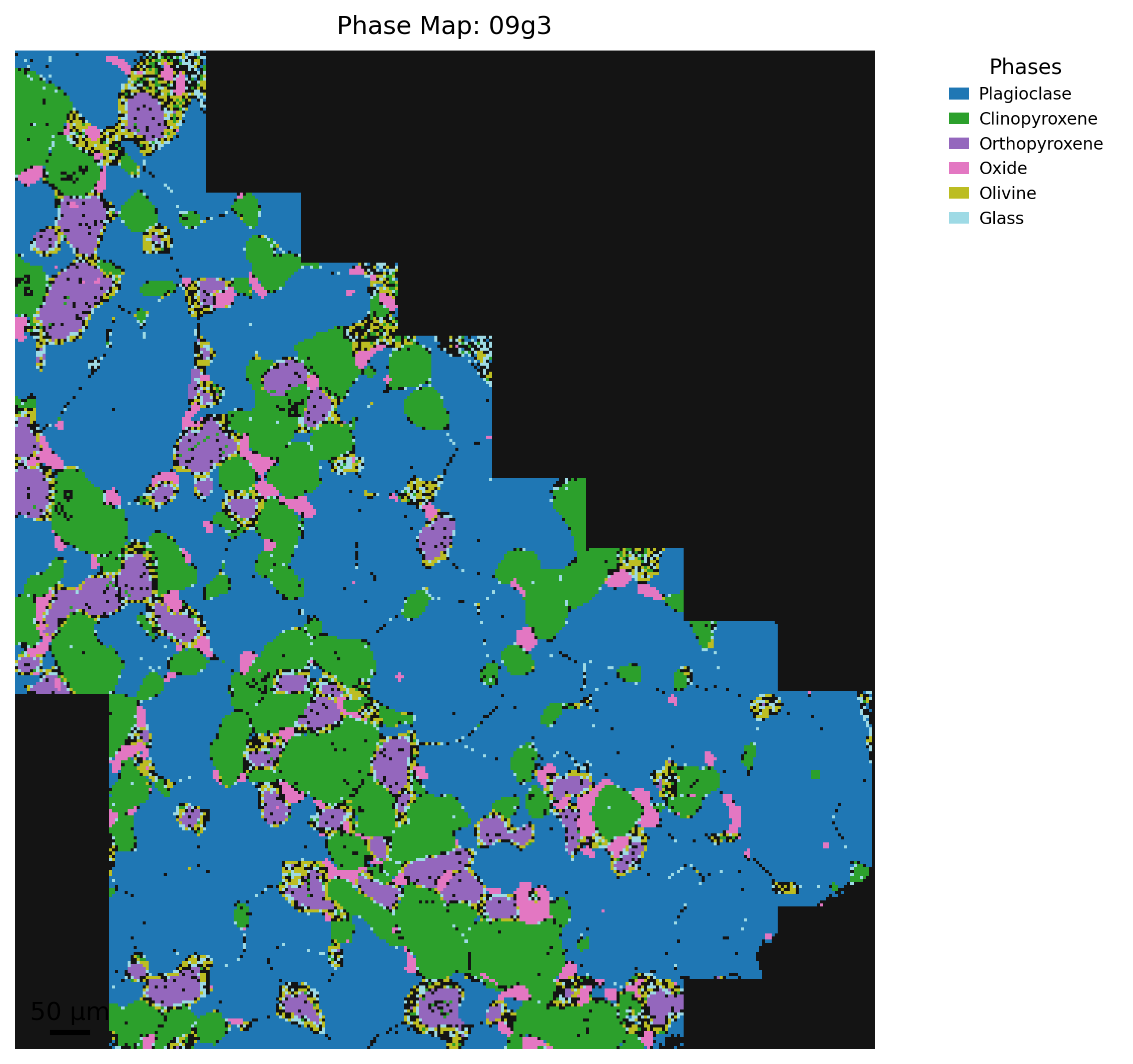
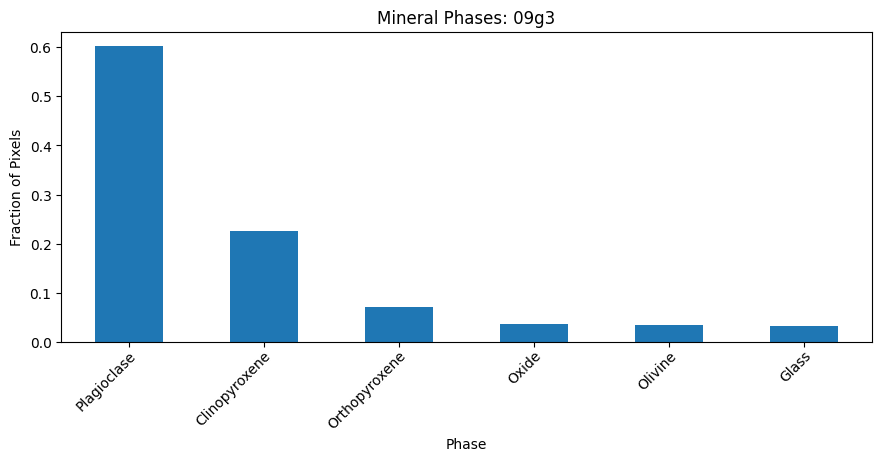
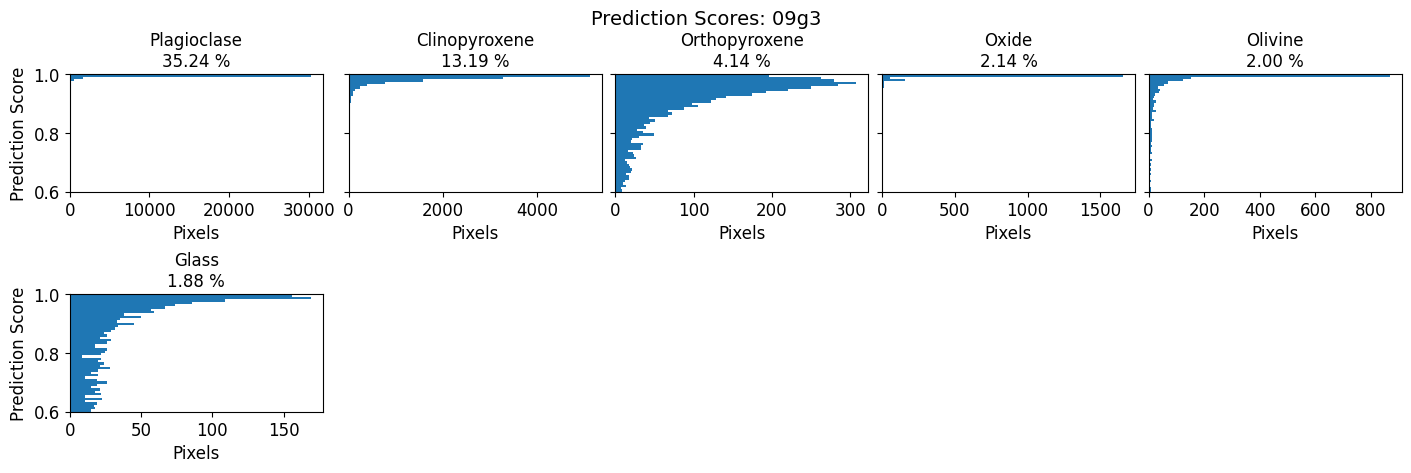
2. Interactive pixel composition picker
mm.interactive_pixels displays the phase map and records the full oxide composition of each pixel you click. Each click:
Places a marker on the map
Prints the oxide values below the figure
Appends a row to the dataframe in
controller["picks"]
Keybindings: r/u undo last pick | c clear all | q/Esc quit
After quitting, access your picks as a DataFrame:
controller["picks"]
[3]:
%matplotlib widget

controller = mm.interactive_pixels(result,
                                   region=3, # side length of square averaging box (1 = single pixel; use odd integers, e.g. 3, 5)
                                   phase=None, # specify phase to display (e.g. "plagioclase"); if None, will display all pixels regardless of phase assignment
                                   )
[4]:
%matplotlib inline

controller["picks"]
[4]:
| x | y | phase | n_pixels | SiO2 | TiO2 | Al2O3 | FeOt | MnO | MgO | CaO | Na2O | K2O | Cr2O3 | Total | Total_raw | |
|---|---|---|---|---|---|---|---|---|---|---|---|---|---|---|---|---|
| 0 | 24 | 74 | Orthopyroxene | 9 | 51.382158 | 0.231275 | 5.935667 | 14.527422 | 0.092448 | 26.585354 | 0.838933 | 0.338983 | -0.013140 | 0.080898 | 100.0 | 99.452320 |
| 1 | 14 | 85 | Orthopyroxene | 9 | 51.755858 | 0.266427 | 6.422178 | 13.811186 | 0.208105 | 26.407858 | 0.979675 | 0.164893 | -0.041242 | 0.025062 | 100.0 | 99.796230 |
| 2 | 41 | 107 | Plagioclase | 9 | 51.243466 | 0.164586 | 31.054675 | 0.062434 | -0.078979 | -0.104385 | 13.301734 | 4.251682 | 0.276118 | -0.171331 | 100.0 | 98.990366 |
| 3 | 38 | 128 | Plagioclase | 9 | 52.196867 | -0.024729 | 30.320998 | 0.405566 | -0.004646 | 0.046737 | 12.551467 | 4.307204 | 0.332112 | -0.131575 | 100.0 | 98.874299 |
| 4 | 95 | 232 | Clinopyroxene | 9 | 49.447336 | 0.722313 | 8.024595 | 6.979877 | 0.101082 | 13.946927 | 19.894387 | 0.797412 | 0.256247 | -0.170175 | 100.0 | 97.394634 |
| 5 | 103 | 240 | Clinopyroxene | 9 | 49.604274 | 0.561800 | 8.036716 | 6.500822 | 0.003462 | 13.893682 | 20.402058 | 0.840622 | 0.130585 | 0.025979 | 100.0 | 99.288592 |
| 6 | 168 | 283 | Oxide | 9 | -0.048897 | 0.267502 | 59.991736 | 22.327466 | -0.148192 | 15.930729 | 0.118597 | 0.117541 | 0.018457 | 1.425061 | 100.0 | 97.400370 |
| 7 | 173 | 283 | Oxide | 9 | -0.249181 | 0.119954 | 60.926417 | 21.555273 | -0.020259 | 16.497383 | 0.043414 | -0.083181 | -0.017739 | 1.227919 | 100.0 | 98.294721 |
2a. Filter to a specific phase
Pass phase to restrict the display and clicks to one or more mineral phases. Pixels outside the selected phase are shown as white background.
[5]:
%matplotlib widget

controller_opx = mm.interactive_pixels(result,
                                       region=3, # side length of square averaging box (1 = single pixel; use odd integers, e.g. 3, 5)
                                       phase="Plagioclase" # plot only pixels classified as plagioclase (optional; if None, will display all pixels regardless of phase assignment
                                       )
2b. Display an oxide heatmap as background
Pass oxide_key to show an oxide or component concentration map instead of the phase map. Combine with phase to restrict to a single mineral.
[6]:
%matplotlib widget

controller_sio2 = mm.interactive_pixels(result,
                                        region=3, # side length of square averaging box (1 = single pixel; use odd integers, e.g. 3, 5)
                                        oxide_key="Feldspar.An", # plot An content of each pixel instead of phase assignment
                                        phase="Plagioclase" # plot only pixels classified as plagioclase (optional; if None, will display all pixels regardless of phase assignment
                                        )
3. Plot pick locations
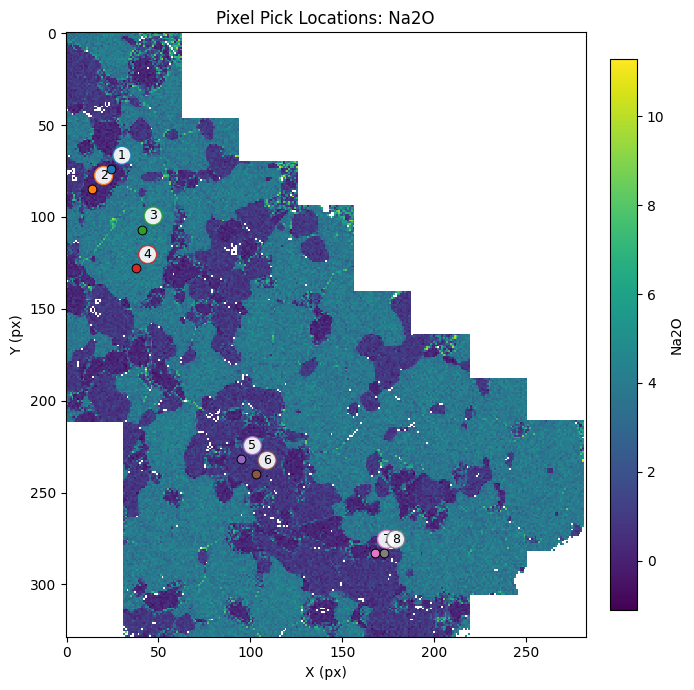
mm.plot_locations overlays picked pixel locations on a map. Pass map_key to use an oxide map as the background.
[7]:
%matplotlib inline

fig, ax = mm.plot_locations(result,
                            controller["picks"], # plot only the pixels that have been picked
                            map_key="Na2O", # color the points by their Na2O content
                            )
4. Interactive line profiles
mm.interactive_line_profile lets you draw transects across a map by clicking a start and end point. Each completed transect is extracted and plotted immediately.
Keybindings: r reset current clicks | u undo last transect | c clear all | q/Esc quit
Access results after quitting:
lp["profiles_df"]     # all profile data concatenated
lp["coordinates_df"]  # transect start/end coordinates
[8]:
%matplotlib widget

lp = mm.interactive_line_profile(
    result,
    key="SiO2", # key of the oxide map to plot the line profile for
    method="none", # do not apply any smoothing to the line profile. use mean or median (across the pixel width) for a smoothed profile
    width_px=5, # width of the line profile in pixels
    pixel_size_um=4.0, # pixel size in micrometers
)
4a. Filter transects to a single phase
Pass phase to mask the background map to pixels of a specific mineral before drawing transects.
[9]:
%matplotlib widget

lp_opx = mm.interactive_line_profile(
    result,
    key="Feldspar.An", # plot the Mg# of pixels classified as plagioclase
    phase="Plagioclase",
    method="none",
    width_px=5,
    pixel_size_um=4.0,
)
Return the line profile dataframe.
[10]:
%matplotlib inline

lp["profiles_df"]
[10]:
| profile_id | distance_px | distance_um | SiO2 | SiO2_smoothed | x | y | perp_distance_px | source | width_px | length_px | length_um | color | x0 | y0 | x1 | y1 | |
|---|---|---|---|---|---|---|---|---|---|---|---|---|---|---|---|---|---|
| 0 | 1 | 0.029312 | 0.117246 | 49.490084 | 49.490084 | 46.0 | 80.0 | 0.452090 | auto | 5.0 | 72.893565 | 291.574258 | #1f77b4 | 46 | 80 | 30 | 151 |
| 1 | 1 | 0.254171 | 1.016684 | 48.257454 | 48.257454 | 45.0 | 80.0 | 1.426481 | auto | 5.0 | 72.893565 | 291.574258 | #1f77b4 | 46 | 80 | 30 | 151 |
| 2 | 1 | 0.479031 | 1.916122 | 50.015794 | 50.015794 | 44.0 | 80.0 | 2.400872 | auto | 5.0 | 72.893565 | 291.574258 | #1f77b4 | 46 | 80 | 30 | 151 |
| 3 | 1 | 0.553984 | 2.215935 | 40.963464 | 40.963464 | 48.0 | 81.0 | -1.721552 | auto | 5.0 | 72.893565 | 291.574258 | #1f77b4 | 46 | 80 | 30 | 151 |
| 4 | 1 | 0.778843 | 3.115373 | 53.601392 | 53.601392 | 47.0 | 81.0 | -0.747161 | auto | 5.0 | 72.893565 | 291.574258 | #1f77b4 | 46 | 80 | 30 | 151 |
| ... | ... | ... | ... | ... | ... | ... | ... | ... | ... | ... | ... | ... | ... | ... | ... | ... | ... |
| 750 | 3 | 36.333159 | 145.332637 | 51.627654 | 51.627654 | 172.0 | 233.0 | 1.929236 | auto | 5.0 | 36.435405 | 145.741620 | #2ca02c | 173 | 197 | 174 | 233 |
| 751 | 3 | 36.358151 | 145.432606 | 60.081533 | 60.081533 | 173.0 | 233.0 | 0.929548 | auto | 5.0 | 36.435405 | 145.741620 | #2ca02c | 173 | 197 | 174 | 233 |
| 752 | 3 | 36.383144 | 145.532574 | 56.881043 | 56.881043 | 174.0 | 233.0 | -0.070139 | auto | 5.0 | 36.435405 | 145.741620 | #2ca02c | 173 | 197 | 174 | 233 |
| 753 | 3 | 36.408136 | 145.632543 | 49.347756 | 49.347756 | 175.0 | 233.0 | -1.069827 | auto | 5.0 | 36.435405 | 145.741620 | #2ca02c | 173 | 197 | 174 | 233 |
| 754 | 3 | 36.433128 | 145.732512 | 52.350107 | 52.350107 | 176.0 | 233.0 | -2.069515 | auto | 5.0 | 36.435405 | 145.741620 | #2ca02c | 173 | 197 | 174 | 233 |
755 rows × 17 columns
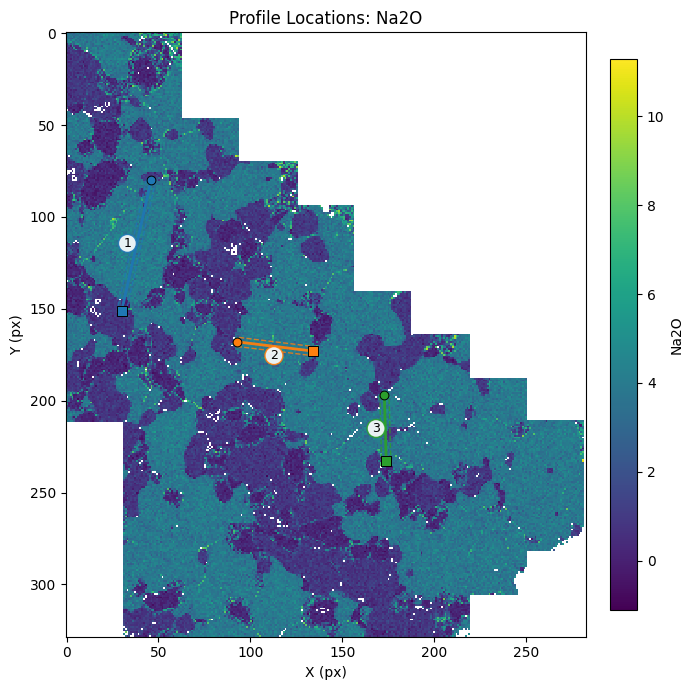
5. Plot transect locations
Pass the coordinates_df from a line profile controller to mm.plot_locations to visualize transect positions.
[11]:
%matplotlib inline

fig, ax = mm.plot_locations(result,
                            lp["coordinates_df"],
                            map_key="Na2O"
                            )
6. Batch extract profiles from saved transects
mm.batch_extract_line_profiles extracts profiles for multiple oxides at once from a saved transect table. Pass lp["coordinates_df"] from an interactive session, or any DataFrame with x0, y0, x1, y1 columns.
Each oxide becomes its own column, making it easy to compare compositions along the same transect.
[12]:
%matplotlib inline

profiles_df = mm.batch_extract_line_profiles(
    result,
    transects=lp["coordinates_df"],
    keys=["SiO2", "Al2O3", "FeOt", "MgO", "CaO", "Feldspar.An"],
    method="none",
    pixel_size_um=4.0,
)

profiles_df
[12]:
| profile_id | x | y | distance_px | perp_distance_px | distance_um | SiO2 | SiO2_smoothed | Al2O3 | Al2O3_smoothed | ... | CaO | CaO_smoothed | Feldspar.An | Feldspar.An_smoothed | x0 | y0 | x1 | y1 | width_px | source | |
|---|---|---|---|---|---|---|---|---|---|---|---|---|---|---|---|---|---|---|---|---|---|
| 0 | 1 | 46.0 | 80.0 | 0.000000 | 0.000000e+00 | 0.000000 | 49.490084 | 49.490084 | 7.699435 | 7.699435 | ... | 21.724662 | 21.724662 | NaN | NaN | 46.0 | 80.0 | 30.0 | 151.0 | 5.0 | auto |
| 1 | 1 | 45.0 | 80.0 | 0.219839 | 9.755361e-01 | 0.879357 | 48.257454 | 48.257454 | 8.595989 | 8.595989 | ... | 19.916674 | 19.916674 | NaN | NaN | 46.0 | 80.0 | 30.0 | 151.0 | 5.0 | auto |
| 2 | 1 | 44.0 | 80.0 | 0.439678 | 1.951072e+00 | 1.758713 | 50.015794 | 50.015794 | 8.705449 | 8.705449 | ... | 20.377495 | 20.377495 | NaN | NaN | 46.0 | 80.0 | 30.0 | 151.0 | 5.0 | auto |
| 3 | 1 | 48.0 | 81.0 | 0.535858 | -2.170911e+00 | 2.143432 | 40.963464 | 40.963464 | 8.341098 | 8.341098 | ... | 2.822591 | 2.822591 | NaN | NaN | 46.0 | 80.0 | 30.0 | 151.0 | 5.0 | auto |
| 4 | 1 | 47.0 | 81.0 | 0.755697 | -1.195375e+00 | 3.022788 | 53.601392 | 53.601392 | 28.690880 | 28.690880 | ... | 10.621687 | 10.621687 | 0.547575 | 0.547575 | 46.0 | 80.0 | 30.0 | 151.0 | 5.0 | auto |
| ... | ... | ... | ... | ... | ... | ... | ... | ... | ... | ... | ... | ... | ... | ... | ... | ... | ... | ... | ... | ... | ... |
| 746 | 3 | 175.0 | 232.0 | 35.042039 | -1.027381e+00 | 140.168155 | 50.870222 | 50.870222 | 32.378985 | 32.378985 | ... | 13.190178 | 13.190178 | 0.675179 | 0.675179 | 173.0 | 197.0 | 174.0 | 233.0 | 5.0 | auto |
| 747 | 3 | 176.0 | 232.0 | 35.069806 | -2.026996e+00 | 140.279224 | 52.350337 | 52.350337 | 30.086376 | 30.086376 | ... | 13.510627 | 13.510627 | 0.654615 | 0.654615 | 173.0 | 197.0 | 174.0 | 233.0 | 5.0 | auto |
| 748 | 3 | 172.0 | 233.0 | 35.958352 | 1.999229e+00 | 143.833408 | 51.627654 | 51.627654 | 30.454367 | 30.454367 | ... | 10.819728 | 10.819728 | 0.499965 | 0.499965 | 173.0 | 197.0 | 174.0 | 233.0 | 5.0 | auto |
| 749 | 3 | 173.0 | 233.0 | 35.986119 | 9.996144e-01 | 143.944477 | 60.081533 | 60.081533 | 22.631185 | 22.631185 | ... | 6.053288 | 6.053288 | NaN | NaN | 173.0 | 197.0 | 174.0 | 233.0 | 5.0 | auto |
| 750 | 3 | 174.0 | 233.0 | 36.013886 | -5.551115e-17 | 144.055545 | 56.881043 | 56.881043 | 25.929915 | 25.929915 | ... | 8.147010 | 8.147010 | 0.367105 | 0.367105 | 173.0 | 197.0 | 174.0 | 233.0 | 5.0 | auto |
751 rows × 24 columns
[13]:
# Long format — one row per oxide per distance bin, useful for plotting
profiles_df, profiles_long_df = mm.batch_extract_line_profiles(
    result,
    transects=lp["coordinates_df"],
    keys=["SiO2", "MgO", "CaO"],
    method="mean",
    pixel_size_um=4.0,
    return_long=True,
)

profiles_long_df
[13]:
| bin | distance_px | value | n_pixels | distance_um | value_smoothed | profile_id | key | source | x0 | y0 | x1 | y1 | width_px | |
|---|---|---|---|---|---|---|---|---|---|---|---|---|---|---|
| 0 | 0 | 0.099427 | 49.490084 | 1 | 0.397708 | 49.490084 | 1 | SiO2 | auto | 46.0 | 80.0 | 30.0 | 151.0 | 5.0 |
| 1 | 1 | 0.298281 | 48.257454 | 1 | 1.193123 | 48.257454 | 1 | SiO2 | auto | 46.0 | 80.0 | 30.0 | 151.0 | 5.0 |
| 2 | 2 | 0.497135 | 45.489629 | 2 | 1.988538 | 45.489629 | 1 | SiO2 | auto | 46.0 | 80.0 | 30.0 | 151.0 | 5.0 |
| 3 | 3 | 0.695988 | 53.601392 | 1 | 2.783953 | 53.601392 | 1 | SiO2 | auto | 46.0 | 80.0 | 30.0 | 151.0 | 5.0 |
| 4 | 4 | 0.894842 | 50.561281 | 1 | 3.579368 | 50.561281 | 1 | SiO2 | auto | 46.0 | 80.0 | 30.0 | 151.0 | 5.0 |
| ... | ... | ... | ... | ... | ... | ... | ... | ... | ... | ... | ... | ... | ... | ... |
| 2260 | 180 | 35.137873 | 13.350402 | 2 | 140.551491 | 13.350402 | 3 | CaO | auto | 173.0 | 197.0 | 174.0 | 233.0 | 5.0 |
| 2261 | 181 | 35.332542 | NaN | 0 | 141.330170 | NaN | 3 | CaO | auto | 173.0 | 197.0 | 174.0 | 233.0 | 5.0 |
| 2262 | 182 | 35.527212 | NaN | 0 | 142.108848 | NaN | 3 | CaO | auto | 173.0 | 197.0 | 174.0 | 233.0 | 5.0 |
| 2263 | 183 | 35.721882 | NaN | 0 | 142.887527 | NaN | 3 | CaO | auto | 173.0 | 197.0 | 174.0 | 233.0 | 5.0 |
| 2264 | 184 | 35.916551 | 8.340008 | 3 | 143.666206 | 8.340008 | 3 | CaO | auto | 173.0 | 197.0 | 174.0 | 233.0 | 5.0 |
2265 rows × 14 columns
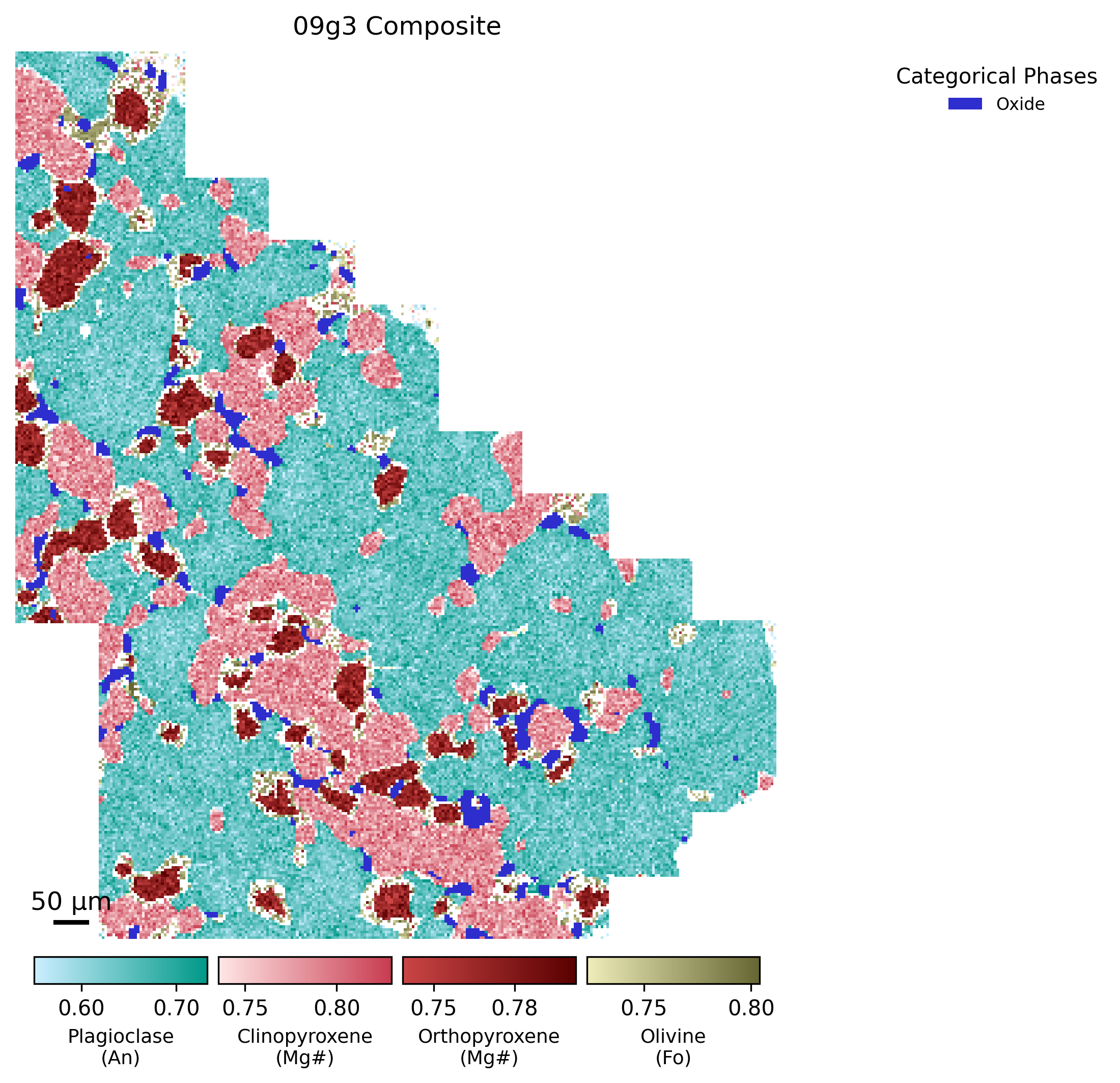
7. Composite component map
mm.plot_component_composite overlays continuous solid-solution compositions (e.g. plagioclase An%, olivine Fo%, pyroxene XMg) on top of a categorical phase map. This gives a single figure showing both phase identity and mineral chemistry.
The component maps are computed automatically by run_map and stored in result["component_maps"].
[14]:
%matplotlib inline
# You can restrict which phases appear and adjust the color limits. `limits_mode="std"` clips the colorbar to the 2 sigma range of each component, which is useful when a few extreme pixels would otherwise compress the color scale.

fig, mineral_map, comp_maps = mm.plot_component_composite(
    result,
    title="09g3 Composite",
    pixel_size_um=4.0,
    scalebar_um=50,
    limits_mode="std", # 2 sigma range for color limits
)
[ ]: